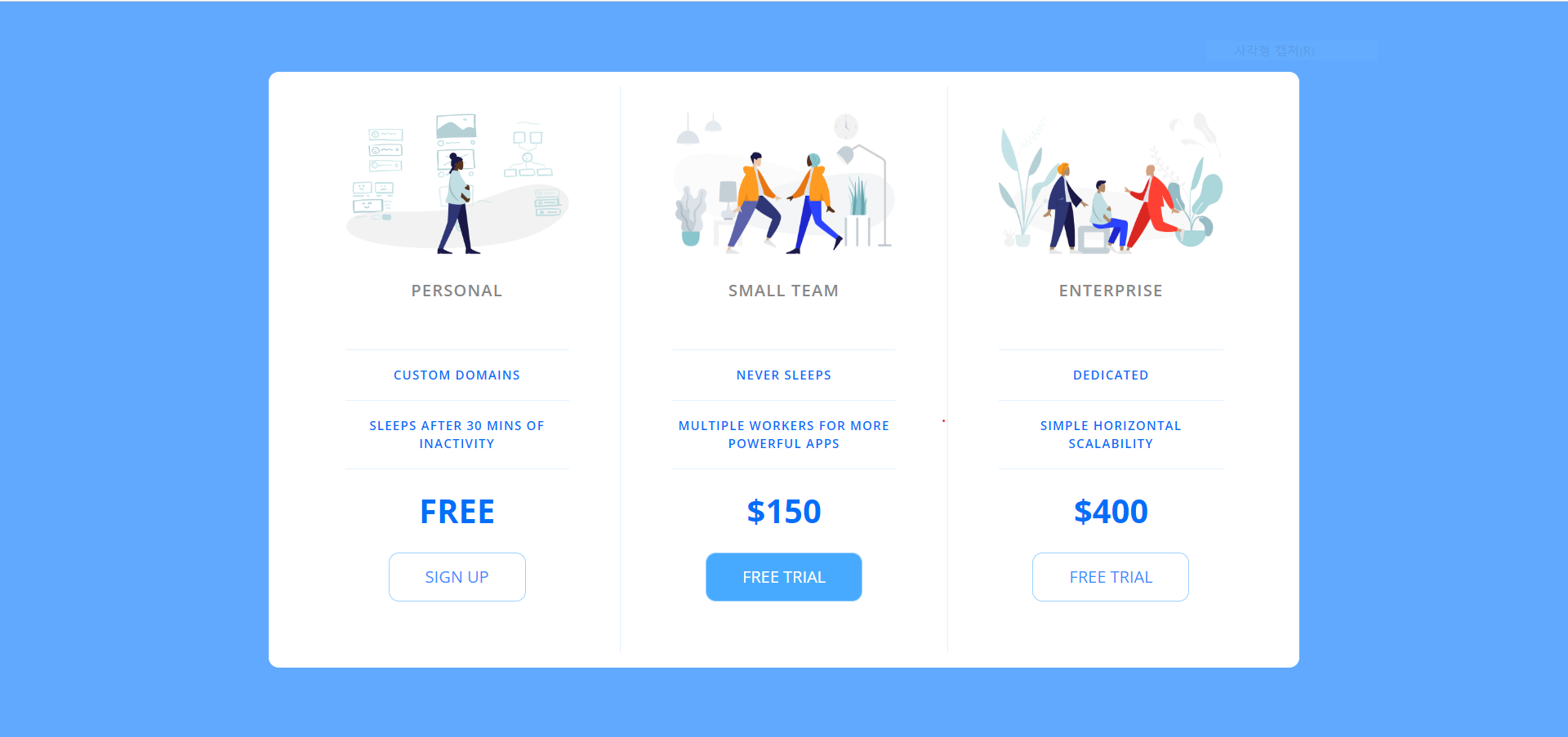

HTML
<!DOCTYPE html>
<html lang="en">

<head>
    <meta charset="UTF-8">
    <meta name="viewport" content="width=device-width, initial-scale=1.0">
    <title>Price Tiers</title>
    <link rel="stylesheet" href="https://fonts.googleapis.com/css?family=Open+Sans:400,600,700">
    <link rel="stylesheet" href="pricingTable.css">
</head>

<body>
    <div class="panel pricing-table">

        <div class="pricing-plan">
            <img src="icons/icon1.png" alt="" class="pricing-img">
            <h2 class="pricing-header">Personal</h2>
            <ul class="pricing-features">
                <li class="pricing-features-item">Custom domains</li>
                <li class="pricing-features-item">Sleeps after 30 mins of inactivity</li>
            </ul>
            <span class="pricing-price">Free</span>
            <a href="#/" class="pricing-button">Sign up</a>
        </div>

        <div class="pricing-plan">
            <img src="icons/icon2.png" alt="" class="pricing-img">
            <h2 class="pricing-header">Small team</h2>
            <ul class="pricing-features">
                <li class="pricing-features-item">Never sleeps</li>
                <li class="pricing-features-item">Multiple workers for more powerful apps</li>
            </ul>
            <span class="pricing-price">$150</span>
            <a href="#/" class="pricing-button is-featured">Free trial</a>
        </div>

        <div class="pricing-plan">
            <img src="icons/icon3.png" alt="" class="pricing-img">
            <h2 class="pricing-header">Enterprise</h2>
            <ul class="pricing-features">
                <li class="pricing-features-item">Dedicated</li>
                <li class="pricing-features-item">Simple horizontal scalability</li>
            </ul>
            <span class="pricing-price">$400</span>
            <a href="#/" class="pricing-button">Free trial</a>
        </div>

    </div>

</body>

</html>// html은 내가 작성한건 아님, CSS만 작성해서 반응형으로 제작함
CSS
html, body, div, span, applet, object, iframe,
h1, h2, h3, h4, h5, h6, p, blockquote, pre,
a, abbr, acronym, address, big, cite, code,
del, dfn, em, img, ins, kbd, q, s, samp,
small, strike, strong, sub, sup, tt, var,
b, u, i, center,
dl, dt, dd, ol, ul, li,
fieldset, form, label, legend,
table, caption, tbody, tfoot, thead, tr, th, td,
article, aside, canvas, details, embed,
figure, figcaption, footer, header, hgroup,
menu, nav, output, ruby, section, summary,
time, mark, audio, video {
	margin: 0;
	padding: 0;
	border: 0;
	font-size: 100%;
	font: inherit;
	vertical-align:
	baseline;
}
/* HTML5 display-role reset for older browsers */
article, aside, details, figcaption, figure,
footer, header, hgroup, menu, nav, section {
	display: block;
}
body {
	line-height: 1;
}
ol, ul {
	list-style: none;
}
blockquote,
q {
    quotes: none;
}

blockquote:before, blockquote:after,
q:before, q:after {
	content: '';
	content: none;
}
table {
	border-collapse: collapse;
	border-spacing: 0;
}


html{
	/* boder-box하면 border까지 합쳐서 박스의 사이즈를 설정한다는 뜻 */
	box-sizing: border-box;
	font-family: 'Open Sans', sans-serif;
}

body{
	background-color: #60a9ff;
	display: flex;
	justify-content: center;
	align-items: center;
	min-height: 100vh;
}

.panel {
	background-color: white;
	border-radius: 10px;
	padding: 15px 25px;
	width: 100%;
	max-width: 960px;
	display: flex;
	flex-direction: column; /* 모바일 사이트로 먼저 만들기 위해 column으로 제작 */
	text-align: center;
	text-transform: uppercase;
}

.pricing-plan{
	border-bottom: 1px solid #e1f1ff;
}

.pricing-plan:last-child{
	border-bottom: none;
}

.pricing-img {
	margin-bottom: 25px;
	max-width: 100%;
}

.pricing-header{
	color: #888;
	font-weight: 600;
	letter-spacing: 1px;
}

.pricing-features {
	margin : 50px 0 25px 0;
	color:  #016ff9;
}

.pricing-features-item{
	font-weight: 600;
	letter-spacing: 1px;
	font-size: 12px;
	line-height: 1.5;
	padding: 15px 0;
	border-top: 1px solid #e1f1ff;
}

.pricing-features-item:last-child{
	border-bottom: 1px solid #e1f1ff;
}

.pricing-price {
	color:  #016ff9;
	display: block;
	font-size: 32px;
	font-weight: 700;
}

.pricing-button{
	border: 1px solid #9dd1ff;
	border-radius: 10px;
	color: #348efe;
	display: inline-block;
	padding: 15px 35px;
	text-decoration: none;
	margin: 25px 0;
	transition: background-color 200ms ease-in-out;
}

.pricing-button:hover, .pricing-button:focus{
	background-color: #e1f1ff;
}

.pricing-button.is-featured {
	background-color: #48aaff;
	color: white;
}

.pricing-button.is-featured:hover, .pricing-button.is-featured:focus{
	background-color: #269aff;
}

@media (min-width: 900px){
	.panel{
		flex-direction: row;
	}
	.pricing-plan{
		border-bottom: none;
		border-right: 1px solid #e1f1ff;
		padding: 25px 50px;
	}
	.pricing-plan:last-child{
		border-right: none;
	}
}
'공부 기록 > JavaScript' 카테고리의 다른 글
| The Web Developer Bootcamp 2022 : [15] JavaScript 문자열 (0) | 2022.08.08 |
|---|---|
| The Web Developer Bootcamp 2022 : [14] JavaScript 기초 (0) | 2022.08.08 |
| [Udemy] The Web Developer Bootcamp 2022 : [10] 반응형 및 Flexbox (0) | 2022.07.18 |
| [Udemy] The Web Developer Bootcamp 2022 : [9] 유용한 CSS 속성들 (0) | 2022.07.16 |
| [Udemy] The Web Developer Bootcamp 2022 : [8] CSS Box Model (0) | 2022.07.11 |